Context Menu of the MEISE Outline View
last modified on Mai 04, 2016
The MEISE Outline View provides the following commands for editing the document:
- “Undo”
 and
“Redo”
and
“Redo”  to reverse and restore
changes in the document.
to reverse and restore
changes in the document. - “Delete”
 deletes
the selection from the document.
deletes
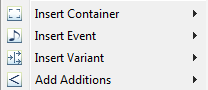
the selection from the document. - The “Insert Container/Variant/Event/Additions" operations are only
available when valid in the selected area (e.g. events can only be
inserted into a layer - see the MEI schema) and offer quick access
to frequently used elements.
- The Measure elements can be relabeled by right-clicking them and
selecting "Relabel
Measures"
 .
. - The
“Clone”
 command
duplicates the selected element with default initial values.
command
duplicates the selected element with default initial values. - To save your changes, click
“Save”
 on the bottom
of the context menu. This button is only active if there have been
changes since the last save.
on the bottom
of the context menu. This button is only active if there have been
changes since the last save.
Attachments
- meise-toolbar_doredo.png (image/png)
- 042-loesche-Auswahl.png (image/png)
- insertContextMenu.png (image/png)
- action-relabelmeasures.png (image/png)
- action-clone.png (image/png)
- save.png (image/png)
- undo_edit.png (image/png)
- redo_edit.png (image/png)